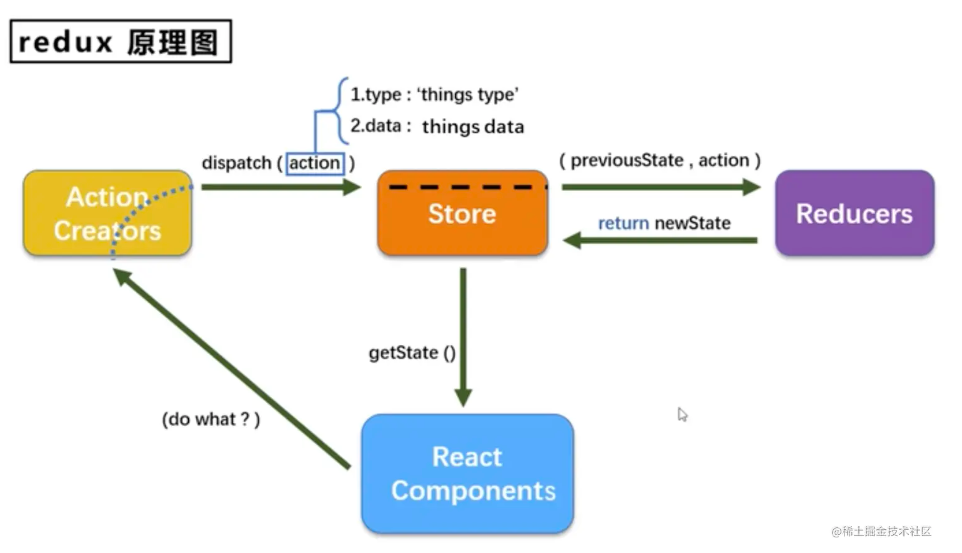
简述
什么是 Redux?
Redux 是一个用于 JavaScript 应用的状态管理库,通常与 React 或 Vue 等前端框架一起使用。它帮助你以一种可预测的方式管理应用状态,并且提供了强大的开发工具支持(如 Redux DevTools)。Redux 的核心思想是:
- 单一数据源:整个应用的状态存储在一个称为 store 的对象中。
- 状态是只读的:唯一改变状态的方法是触发一个 action(动作),action 是一个描述发生了什么的对象。
- 使用纯函数来执行修改:为了指定如何根据 action 更新状态,你需要编写 reducers(纯函数),它们接收旧的状态和 action,然后返回新的状态。
核心概念
- Action:描述发生了什么,是一个普通的对象,必须包含
type字段。 - Reducer:定义了 state 如何响应不同的 actions。它是一个纯函数,接受旧的 state 和 action,返回新的 state。
- Store:保存着应用的状态树。可以通过
getState()获取状态、通过dispatch(action)触发状态更新、通过subscribe(listener)设置监听器。
Redux Demo 示例
步骤 1: 安装依赖
首先,确保你的项目已经安装了 Redux 和 React-Redux(如果与 React 结合使用)。
npm install redux react-redux
步骤 2: 创建 Actions
创建一个文件 actions/userActions.js,定义用户相关的动作。
export const login = userData => ({
  type: 'LOGIN',
  payload: userData
});

export const logout = () => ({
  type: 'LOGOUT'
});
创建一个文件 actions/counterActions.js,定义增加和减少计数的动作。
export const increment = (value = 1) => ({
  type: 'INCREMENT',
  payload: value, // 携带自定义增量
});

export const decrement = (value = 1) => ({
  type: 'DECREMENT',
  payload: value, // 携带自定义减量
});
步骤 3: 创建 Reducer
创建一个文件 userReducer.js。
const initialState = {
  name: '',
  isLoggedIn: false,
};

export default function userReducer(state = initialState, action) {
  switch (action.type) {
    case 'LOGIN':
      return { ...state, name: action.payload.name, isLoggedIn: true };
    case 'LOGOUT':
      return { ...state, name: '', isLoggedIn: false };
    default:
      return state;
  }
}
创建一个文件 counterReducer.js,定义如何处理这些动作。
const initialState = {
  count: 0
};

function counterReducer(state = initialState, action) {
  switch (action.type) {
    case 'INCREMENT':
      return { ...state, count: state.count + action.payload };
    case 'DECREMENT':
      return { ...state, count: state.count - action.payload };
    default:
      return state;
  }
}

export default counterReducer;
用 combineReducers 合并它们 rootReducer.js:
import { combineReducers } from 'redux';
import userReducer from './userReducer';
import counterReducer from './counterReducer';

const rootReducer = combineReducers({
  user: userReducer, // store.user
  counter: counterReducer // store.counter
});

export default rootReducer;
步骤 4: 配置 Store
在 store.js 中配置 Redux store。
import { createStore } from 'redux';
import rootReducer from './rootReducer';

const store = createStore(rootReducer);

export default store;
步骤 5: 将 Redux 连接到 React 组件
在 index.js 或主组件文件中连接 Redux。
import React from 'react';
import ReactDOM from 'react-dom';
import { Provider } from 'react-redux';
import App from './App'; // 假设这是你的根组件
import store from './store';

ReactDOM.render(
  <Provider store={store}>
    <App />
  </Provider>,
  document.getElementById('root')
);
步骤 6: 在组件中使用 Redux
最后,在 App.js 中展示并操作计数器。
import React from 'react';
import { useSelector, useDispatch } from 'react-redux';
import { increment, decrement } from './actions/counterActions';
import { login, logout } from './actions/userActions';

function App() {
  const count = useSelector(state => state.count);
  const { name, isLoggedIn } = useSelector(state => state.user);
  const dispatch = useDispatch();

  return (
    <div style={{ padding: '20px', fontSize: '18px' }}>
      <h1>Count: {count}</h1>

      {/* 固定值操作 */}
      <button onClick={() => dispatch(increment())}>+1</button>
      <button onClick={() => dispatch(decrement())}>-1</button>

      {/* 自定义值操作 */}
      <br />
      <br />
      <button onClick={() => dispatch(increment(5))}>+5</button>
      <button onClick={() => dispatch(decrement(3))}>-3</button>

      {/* 动态输入 */}
      <br />
      <br />
      <input
        type='number'
        defaultValue={1}
        id='step'
        style={{ width: '60px', marginRight: '10px' }}
      />
      <button
        onClick={() => {
          const step = Number(document.getElementById('step').value) || 1;
          dispatch(increment(step));
        }}
      >
        Add Custom
      </button>

      <h1>User: {name || 'Guest'}</h1>
      {isLoggedIn ? <button onClick={() => dispatch(logout())}>Logout</button> : <button onClick={() => dispatch(login({ name: 'Alice' }))}>Login</button>}
    </div>
  );
}

export default App;